
CAD for 3D printing · no CAD skills

Describe a part.
Watch it build.
Print it.

Tell the AI you already use what you need. nurb models it in front of you, checks it will print, and hands you the file.

Free · Apple silicon and Intel
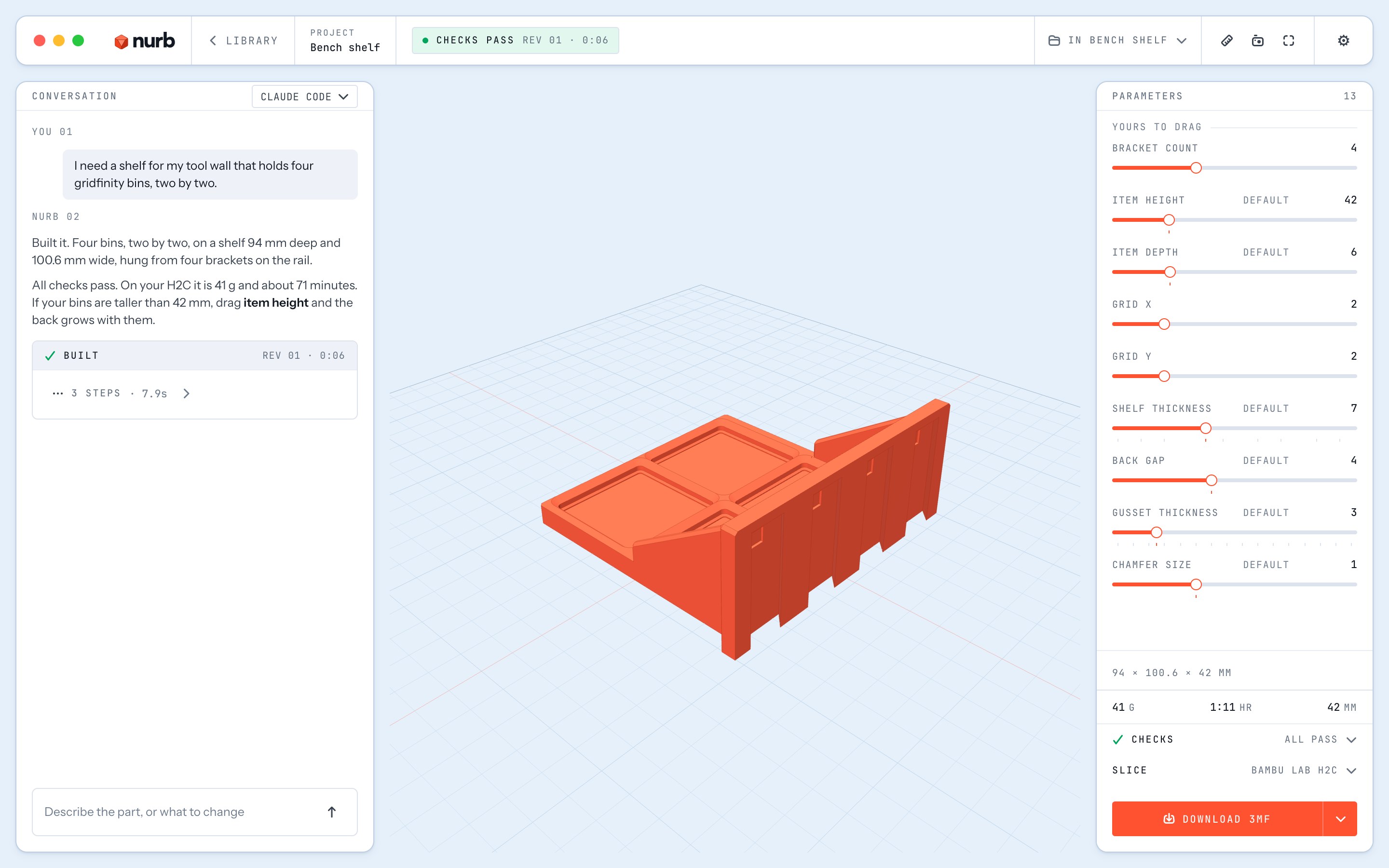
The nurb app: the conversation on the left, a gridfinity shelf built on the stage, and its parameters as sliders on the right
The conversation

Revisions are
sentences too.

Look at the part and say what's wrong with it. No sketches, no constraints, no toolbar with forty tools. CAD software never opens.

It asks, never guessesIt asks for the real dimension instead of inventing one.
Millimeters, not menusEvery dimension becomes a slider you can drag.
Your tweaks stickDrag a slider and your AI keeps designing from your numbers.
Files that just work3MF or STL for your slicer. STEP if a machine shop asks.
ConversationVac hose adapter
You

It wobbles on the vac hose. Way too loose.

nurb

Measure the outside of the hose end for me. Calipers if you have them, a careful ruler works.

You

57.4 mm

BuiltRev 03

Bored the cuff to 57.6 mm, a snug push fit. Checks still clean, and your file is ready.

✓ All checks passØ57.6 → Ø35.0 · 74 mm
Ask a follow-up…SEND
The safety net

Nine hours of printing.
Checked before it starts.

Every version is checked against print physics, calibrated on parts that really printed, for the printer you own. Problems show up in the app, not on the bed.

Steep slopesOverhangs that sag or peel away as they print.
Thin wallsSections finer than your nozzle can lay down.
Tiny detailsFeatures that smear instead of printing.
Mid-air startsMaterial with nothing underneath to land on.
Top-heavy shapesTall parts that tip over before they finish.
Long reachesArms that sag under their own weight, or snap in use.
Loose piecesA part that quietly came apart into two.
The wrong sizeToo big for the printer you actually own.
Real-world shapes

Some shapes come
from a phone, not a ruler.

Sweep the thing for ten seconds with a free scanning app. nurb reads the shape in millimeters and builds your part against its real contour.

siding_scan.objPhone scan · 10 s
Read as300 × 250 mm · 5 mm courses
BracketHugs the profile
More than one part

It opens the lid
before your printer does.

Parts that work together get tested together. It swings the hinge through its full travel and names the angle where it hits.

Lid hinge · swing110°
Was: jams at 84° on the shelf aboveNow: rests open

One download
and a sentence.

The Mac app is the whole thing in one window. It sets itself up the first time you open it and keeps itself up to date.

Bring your own AI

Use the AI you already pay for.

Sign in to Claude, ChatGPT or Grok inside the app. Already use Claude Code, Codex or Cursor? Connect it in Settings and it designs parts in the same window.